Automating Cloud Development Workflows with AI
Deploying and debugging cloud systems using AI tools including MCP and Hooks
AI-assisted coding can be addictive: ideas flowing, code practically writing itself. But the momentum usually dies the moment you try to deploy. Suddenly you are debugging access permissions, fighting infrastructure-as-code errors, and wondering why everything that worked locally breaks in production. The creative flow that got you here evaporates the moment you take AI-generated code and try to launch it into the cloud.
Agentic IDEs are built to handle both sides: keeping up with your creative pace while managing the operational lift of deploying to the cloud. In this post, we cover agentic coding fundamentals, MCP servers, automation hooks, and how to use these tools to deploy and debug cloud systems in production.
Agentic Coding: Structure Without Friction
The key difference between an agentic IDE and a standard AI chatbot is context. An agentic IDE can examine your project code to understand what you are building, create files and folders, run terminal commands, and modify your local environment with the configurations you need. This enables a genuinely hands-off approach: you can ask it not just to write code, but to write and run tests, set up local infrastructure, and iterate until things work.
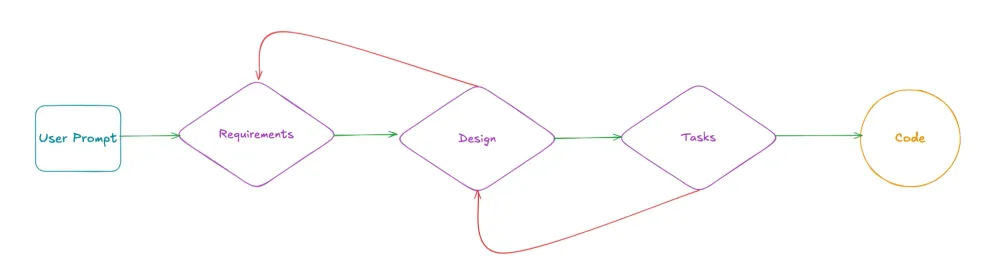
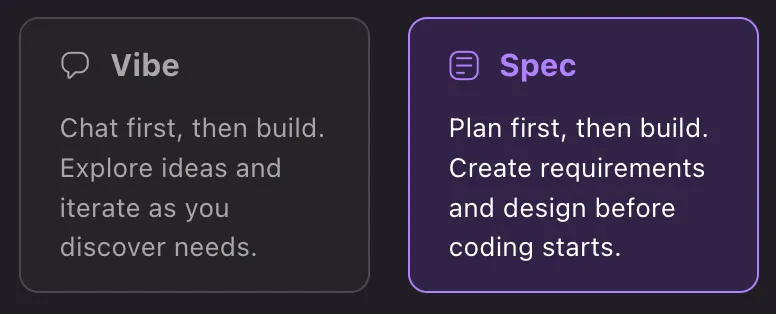
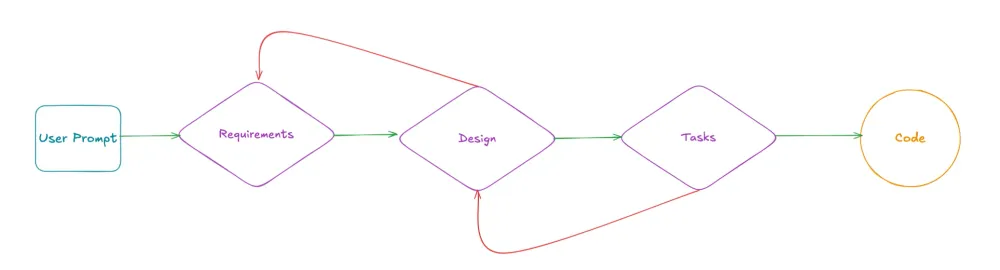
Agentic IDEs typically support two modes of working. Vibe mode is conversational and exploratory. Spec-driven mode lets the agent independently orchestrate an entire project with human oversight at each stage.
In spec-driven mode, you describe your project and the agent generates three structured documents: a requirements file, a design document outlining the proposed architecture, and a task list breaking the work into discrete steps. You can execute these tasks directly, or iterate on the requirements and design before proceeding. This is particularly useful for healthcare AI projects where the architecture needs to be reviewed and approved before implementation begins.
Supercharging Development with MCP Servers
What is MCP?
Model Context Protocol (MCP) is an open standard for connecting AI agents to external tools and data sources. Instead of relying solely on training data that can become stale, MCP gives agents real-time access to documentation, APIs, and workflows. Agentic IDEs support MCP natively: you configure servers in a JSON file and they are immediately available to the agent. See the MCP documentation to get started.
Useful MCP Servers for Cloud Development
Cloud providers publish official MCP servers that bring up-to-date platform expertise directly into your development workflow. Some particularly useful ones:
- AWS Knowledge MCP Server: Lets the agent search and fetch current API references, architecture guidance, CDK and CloudFormation templates, and regional availability information. Useful for getting accurate answers about service behaviour without leaving the editor.
- Cloud Control API MCP Server: Gives the agent read and write access to live cloud resources through natural language. You can ask it to create, inspect, update, or delete resources and it will execute the operation and return the result.
- IaC MCP Server: Generates infrastructure-as-code with security compliance checks built in.
- Terraform MCP Server: Supports IaC workflows with integrated security scanning.
- Pricing MCP Server: Estimates costs before you deploy, useful for validating architecture decisions against budget constraints.
Agent Hooks: Automating the Repetitive Work
What are Hooks?
Hooks let you wire up automated agent tasks that trigger on specific IDE events. Think of them as event-driven automation for your development workflow: when a file is saved, when a commit is made, when the agent finishes a task. Hooks live as JSON files in your project and fire automatically when their trigger conditions are met. See the hooks documentation for the full reference.
Available trigger types include:
fileEdited: when you save a filefileCreated: when a new file is addedfileDeleted: when a file is removedagentStop: when an agent execution completespromptSubmit: when you send a message to the agentuserTriggered: manual on-demand execution
Practical Examples
Auto-run tests when saving code:
{
  "name": "Run Tests on Save",
  "version": "1.0.0",
  "when": {
    "type": "fileEdited",
    "patterns": ["src/**/*.ts"]
  },
  "then": {
    "type": "askAgent",
    "prompt": "Run the tests related to the edited file and fix any failures"
  }
}
Validate access control policies against least-privilege principles on save:
{
  "name": "Access Control Policy Check",
  "version": "1.0.0",
  "when": {
    "type": "fileEdited",
    "patterns": ["**/iam-*.json", "**/policy*.json"]
  },
  "then": {
    "type": "askAgent",
    "prompt": "Review this access control policy for least-privilege violations and suggest tighter permissions"
  }
}
Update infrastructure templates when application code changes:
{
  "name": "Sync Infrastructure Template",
  "version": "1.0.0",
  "when": {
    "type": "fileEdited",
    "patterns": ["lambdas/**/*.py"]
  },
  "then": {
    "type": "askAgent",
    "prompt": "Check if the infrastructure template needs updates to reflect changes in the function"
  }
}
Hooks and MCP Together
Combining hooks with MCP servers enables powerful automated workflows. For example: save a function file and a hook triggers the agent to use the documentation MCP server to verify the implementation against current best practices. Edit infrastructure code and a hook triggers a compliance scan via the IaC MCP server. Create a new resource definition and a hook checks regional availability before the code is committed.
Deploying to the Cloud
Through terminal access, an agentic IDE can run CLI commands directly. This means you can go from writing a function to deploying it to a development environment without leaving the conversation.
Direct deployment examples:
"Deploy this CDK stack to my dev account"
→ runs: cdk deploy --require-approval never

"Use SAM to deploy and test this API"
→ runs: sam build && sam deploy --guided

"Apply these Terraform changes"
→ runs: terraform plan && terraform apply -auto-approve
The agent can also generate CI/CD pipeline configurations:
"Create a GitHub Actions workflow to deploy this on push to main"
→ writes .github/workflows/deploy.yml with proper credential handling

"Add a pipeline for this CDK app"
→ scaffolds the pipeline with source, build, and deploy stages
The typical workflow looks like this:
- Describe what you want built
- The agent writes the infrastructure code
- Ask the agent to deploy it using CLI commands
- Test in your actual cloud environment
- Iterate until it works, then commit
Debugging in the Cloud
Code that works locally often breaks when deployed. The gap is usually between what you think is deployed and what is actually running. An agentic IDE with cloud access can close that gap by inspecting live resources and cross-referencing current documentation in real time.
Inspecting Live Resources
The Cloud Control API MCP server gives the agent read access to the actual state of your deployed resources. This means it can read current configuration (seeing exactly how a function, API, or policy is configured right now, not what your template says it should be), compare expected versus actual state to spot drift, and list resources to find orphaned or misconfigured infrastructure.
Troubleshooting with Documentation Access
Once you know what is deployed, you need to understand why it is broken. The AWS Knowledge MCP server helps here by searching error messages against current solutions, looking up correct API settings and required permissions, and surfacing recommended fixes for common failure patterns like cold starts, timeouts, and permission errors.
Example: Debugging a Permission Error
Say a function is returning a 403 when trying to read from object storage. The agent will use the Cloud Control API to read the function execution role, inspect the attached policy, use the documentation MCP to look up the required permissions, identify the missing permission, and suggest the fix. Problem diagnosed and resolved without leaving the editor, without digging through logs, without clicking through consoles.
The traditional debugging path is: error, check logs, ask an AI chatbot, try to replicate locally, repeat. With an agentic IDE and live cloud access, it becomes: error, inspect actual state, get current documentation, apply fix. The difference is context.
Conclusion
Agentic coding keeps development moving fast. Spec-driven mode adds structure without slowing you down. MCP servers replace stale training data with live documentation and real resource state. Hooks handle the repetitive validation work automatically. Together, these tools close the gap between writing code and running it reliably in production, which is exactly the gap that matters most in regulated healthcare environments where every deployment needs to be correct the first time.